Creating a PCA Plot
This page will instruct you in the creation of a principal component analysis (PCA) plot using the custom pcaPlot() function and to provide background on the purpose and interpretation of PCA plots. These steps are intended to follow the calculation of relative abundance.
What is a PCA Plot?
A PCA plot is a graphical representation of Principal Component Analysis (PCA), a technique used to reduce the dimensionality of complex datasets while preserving as much variability (or information) as possible.
In many datasets, you might have a large number of variables (features). PCA helps simplify such datasets by transforming them into a smaller set of uncorrelated variables called principal components (PCs). These PCs capture the maximum variation in the data, with each successive PC accounting for progressively less of the remaining variability.
For FoodSeq data the variables are the food taxa detected in each sample, so a phyloseq containing many food taxa can be summarized in a plot with two axes. Each point is one sample, and samples that sit close together tend to have more similar food profiles than samples that sit far apart. Because each PC is a weighted combination of many foods rather than a single measurement, the values along the axes are not directly interpretable on their own. What the axis labels do tell you is the percentage of the total variation that each component accounts for.
pcaPlot() produces a biplot, which layers a second kind of information onto the same axes: arrows drawn from the origin, each representing one food taxon. These arrows are the loadings. The direction of an arrow shows how that food relates to the two components being plotted, and its length shows how strongly the food contributes to them, so together the arrows show which foods drive the spread you see in the points. Not every taxon gets an arrow. The function ranks all taxa by arrow length and draws only the top nTaxa, so setting nTaxa = 10 shows the ten taxa with the strongest influence on those two components. The rest are left off to keep the plot readable.
Input
Before creating a PCA plot, you must have a CLR-transformed, foods-only phyloseq — see Relative Abundance and CLR Transform for how to compute ps.filt.clr. That object is what feeds into pcaPlot() below.
pcaPlot() Function
To-do
This section is waiting on the current pcaPlot() from the foodseq.tools package. Until that is swapped in, three things here are known to be out of date: the function below, the worked outputs under Understanding the Output, and the example call above the figure in Interpreting the PCA Plot. The function as shown does not reproduce the biplot further down this page.
The function below was written by Ben Neubert to create a PCA plot. After reading it into your analysis file, run:
at minimum to plot a PCA. The inputs of Ben's function are:
ps(required) — your phyloseq objectcolorVar(required) — the variable from your sample metadata to color the samples bycolorName(required) — a legend title corresponding to thecolorVarvariablenTaxa(required) — the number of taxa to display loadings forcustomColors(optional) — a vector of colors corresponding in length to the number of unique values forcolorVar; by defaultNULLxPC(optional) — the principal component for the x-axis; by default1yPC(optional) — the principal component for the y-axis; by default2ellipse(optional) — a Boolean for the option to add centroid ellipses to your plot; by defaultFALSE
pcaPlot <- function(ps, # clr transformed and filtered data
                    colorVar, # variable from samdf to color samples by
                    colorName, # what to display variable name as in legend
                    nTaxa, # number of taxa to display
                    customColors = NULL, # optional named vector of colors
                    xPC = 1, # Principal Component for x-axis
                    yPC = 2,  # Principal Component for y-axis
                    ellipse = FALSE # optional add centroid ellipses
                    ) {

  if ("name" %in% colnames(data.frame(ps@sam_data))) {
    # Prevent conflict with 'name' column
    sample_data(ps) <- ps@sam_data %>%
      data.frame() %>%
      dplyr::rename(name.x = name)
  }

  samdf <- data.frame(ps@sam_data) %>%
    rownames_to_column(var = 'name')

  # PCA
  pca <- prcomp(ps@otu_table, center = TRUE, scale = FALSE)

  # % variance explained
  eigs <- pca$sdev^2
  varExplained <- 100 * eigs / sum(eigs)
  names(varExplained) <- paste0('PC', seq_along(varExplained))

  # Extract variance explained for specified PCs
  ve.xPC <- as.character(round(varExplained[paste0('PC', xPC)], 3))
  ve.yPC <- as.character(round(varExplained[paste0('PC', yPC)], 3))

  # PCA scores
  pca.df <- data.frame(pca$x) %>%
    rownames_to_column(var = 'name')

  # Add back sample data
  pca.df <- left_join(pca.df, samdf, by = "name")

  # Calculate plotting limits based on specified PCs
  limit <- max(abs(pca.df[, c(paste0('PC', xPC), paste0('PC', yPC))])) +
    0.05 * max(abs(pca.df[, c(paste0('PC', xPC), paste0('PC', yPC))]))

  # Initialize PCA plot
  pca.plot <- ggplot(pca.df, aes_string(x = paste0('PC', xPC), y = paste0('PC', yPC), color = colorVar)) +
    geom_point(size = 2, alpha = 0.5) +
    coord_equal() +
    labs(x = paste0('PC', xPC, ' (', ve.xPC, '%)'),
         y = paste0('PC', yPC, ' (', ve.yPC, '%)')) +
    xlim(-limit, limit) + ylim(-limit, limit) +
    theme_classic() +
    theme(axis.line = element_line(size = 1, color = 'black'),
          axis.ticks = element_line(color = 'black'),
          axis.title = element_text(size = 14, face = 'bold', color = 'black'))

  # Add custom color scale if provided
  if (!is.null(customColors)) {
    pca.plot <- pca.plot + scale_color_manual(values = customColors)
  }

  # Add optional ellipses
  if (ellipse) {
    pca.plot <- pca.plot + stat_ellipse(level = 0.95, aes_string(group = colorVar), linetype = "dashed")
  }

  # Calculate loadings
  V <- pca$rotation # Eigenvectors
  L <- diag(pca$sdev) # Diagonal matrix with square roots of eigenvalues
  loadings <- V %*% L
  colnames(loadings) <- colnames(V)  # Assign column names to loadings

  # Get loadings for specified PCs and format for plotting
  loadings.xy <- data.frame(loadings[, c(paste0('PC', xPC), paste0('PC', yPC))]) %>%
    dplyr::rename(PCx = paste0('PC', xPC), PCy = paste0('PC', yPC)) %>%
    mutate(variable = row.names(loadings),
           length = sqrt(PCx^2 + PCy^2),
           ang = atan2(PCy, PCx) * (180 / pi))

  loadings.plot <- top_n(loadings.xy, nTaxa, wt = length)

  # Adjust angles to keep labels upright
  loadings.plot <- loadings.plot %>%
    mutate(adj_ang = ifelse(ang < -90, ang + 180,
                     ifelse(ang > 90, ang - 180, ang)))

  # Rename loadings with lowest taxonomic level
  loadings.taxtab <- tax_table(ps)[row.names(loadings.plot)] %>%
    data.frame()
  loadings.taxtab <- loadings.taxtab[cbind(1:nrow(loadings.taxtab), max.col(!is.na(loadings.taxtab), ties.method = 'last'))] %>%
    data.frame()
  colnames(loadings.taxtab) <- c("name")
  loadings.taxtab$asv <- tax_table(ps)[row.names(loadings.plot)] %>%
    data.frame() %>%
    rownames()

  loadings.plot <- loadings.taxtab %>%
    dplyr::select(asv, name) %>%
    right_join(loadings.plot, by = c('asv' = 'variable'))

  # Determine the quadrant of each label
  q1 <- filter(loadings.plot, PCx > 0 & PCy > 0)
  q2 <- filter(loadings.plot, PCx < 0 & PCy > 0)
  q3 <- filter(loadings.plot, PCx < 0 & PCy < 0)
  q4 <- filter(loadings.plot, PCx > 0 & PCy < 0)

  pca.biplot <-
       pca.plot +
       geom_segment(data = loadings.plot,
                    aes(x = 0, y = 0,
                        xend = PCx, yend = PCy),
                    color = 'black',
                    arrow = arrow(angle = 15,
                                  length = unit(0.1, 'inches'))) +
    labs(color = colorName)

  # Add geom_text for each quadrant with adjusted angle and justification
  if (nrow(q1) != 0) {
       pca.biplot <- pca.biplot +
            geom_text(data = q1, aes(x = PCx, y = PCy, hjust = 0, vjust = 0, angle = adj_ang,
                                     label = name,
                                     fontface = 'bold'),
                      color = 'black', show.legend = FALSE)
  }
  if (nrow(q2) != 0) {
       pca.biplot <- pca.biplot +
            geom_text(data = q2, aes(x = PCx, y = PCy, hjust = 1, vjust = 0, angle = adj_ang,
                                     label = name,
                                     fontface = 'bold'),
                      color = 'black', show.legend = FALSE)
  }
  if (nrow(q3) != 0) {
       pca.biplot <- pca.biplot +
            geom_text(data = q3, aes(x = PCx, y = PCy, hjust = 1, vjust = 1, angle = adj_ang,
                                     label = name,
                                     fontface = 'bold'),
                      color = 'black', show.legend = FALSE)
  }
  if (nrow(q4) != 0) {
       pca.biplot <- pca.biplot +
            geom_text(data = q4, aes(x = PCx, y = PCy, hjust = 0, vjust = 1, angle = adj_ang,
                                     label = name,
                                     fontface = 'bold'),
                      color = 'black', show.legend = FALSE)
  }

  return(list(pca.df = pca.df, pca.biplot = pca.biplot, loadings = loadings))
}
Understanding the Output
The pcaPlot() function returns three things: loadings, representing the PCA loadings; pca.df, representing the PCA scores; and pca.biplot, the PCA plot.
loadings should look like this:
$pca.df

$pca.biplot

$loadings
                                                                                     PC1           PC2           PC3
ATCCTTCTTTCCGAAAACAAAATAAAAGTTCAGAAAGTTAAAATAAAAAAGG                        -0.945388925  0.5892904525 -0.0973427943
ATCCTTATTTTGAGAAAACAAAGGTTTATAAAACTAGAATTTAAAAG                              0.098959450 -3.8495772105  0.7049946079
ATCCGTGTTTTGAGAAAACAAGGGGTTCTCGAACTAGAATACAAAGGAAAAG                         1.228102502 -1.5218304409 -0.1646736346
ATCCGTGTTTTGAGAGGGGGGTTCTCGAACTAGAATACAAAGGAAAAG                             2.535100338  0.2163598635 -1.3204555799
ATCCTGGGTTACGCGAACAAAACAGAGTTTAGAAAGCGG                                      1.782297628  0.7683108632  3.2098321172
ATCCTGTTTTCAGAAAACAAGGGTTCAGAAAGCGAGAACCAAAAAAAGGATAG                        0.618113591  0.0999320340 -0.5458098584
ATCCATGTTTTGAGAAAACAAGCGGTTCTCGAACTAGAACCCAAAGGAAAAG                         0.616755384 -0.7076333908 -0.9999314334
Each row is an ASV and each column is a principal component. loadings represents the degree to which each ASV contributes to each principal component, where the sign indicates the relationship with the PC and the absolute value indicates the strength of contribution. You can use loadings to identify which variables drive separation the most.
pca.df should look like this:
| name | PC1 | PC2 | PC3 | PC4 | PC5 | PC6 |
|---|---|---|---|---|---|---|
| 3-B11 | -8.0250433 | -1.0884380 | 0.6269016 | 1.92399773 | -3.8568241 | 0.0976452 |
| 3-D11 | -7.9289715 | 8.0726668 | -1.6161495 | 1.46896403 | -0.1878901 | -0.3016497 |
| 3-F11 | -10.0973405 | 6.8490332 | -1.1455442 | 1.96876274 | -1.9607628 | 1.3939926 |
| 3-G11 | -11.2714679 | 9.4835516 | -1.4488316 | 2.28493958 | -1.4831855 | 1.4202594 |
| 4-A01 | 5.9251184 | -5.0456726 | -3.6501921 | 5.07511353 | -2.2493445 | -2.9363608 |
| 4-A02 | -4.1142239 | -7.6482507 | 0.1921778 | 3.06642220 | -1.1873046 | -2.5132890 |
| 4-A03 | 1.2596879 | -2.3772487 | 4.0742153 | 0.15822156 | -6.4265191 | 1.8207811 |
| 4-A04 | 4.7598974 | -3.4523810 | -4.5502059 | -2.54135272 | 1.9651763 | 8.6794485 |
| 4-A05 | -3.6920555 | -3.4102144 | -1.5141453 | -0.38240620 | -6.2446326 | 0.8044125 |
| 4-A06 | -0.1208256 | -5.7453982 | -6.2540801 | -4.07782675 | -0.8463138 | 7.7707162 |
Each row is a sample and each column is a principal component or a metadata field. pca.df represents the PCA scores for each sample, which allows for plotting sample separation in PCA space, colored by a chosen metadata field.
The PCA plot pca.biplot and its interpretation will be covered in the next section.
Interpreting the PCA Plot
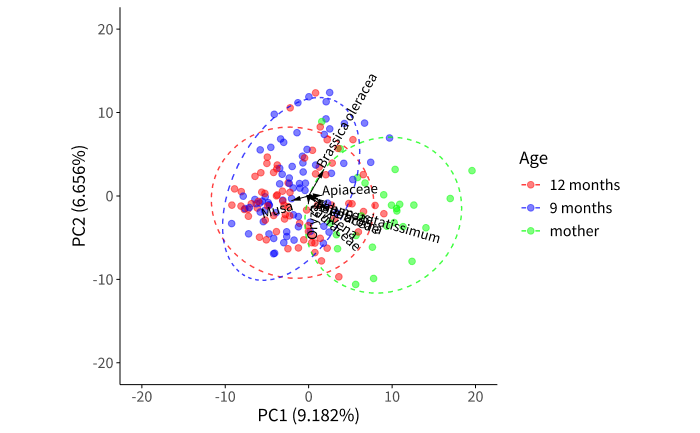
Below is an example of a PCA biplot to interpret. It shows CLR-transformed trnL (plant) data pooled across five cohorts, colored by cohort, with the ten longest loadings drawn as arrows. It was created with:
cohort_colors <- c("A" = "#E69F00", "B" = "#56B4E9", "C" = "#009E73",
                   "D" = "#D55E00", "E" = "#CC79A7")

pca <- pcaPlot(ps.filt.clr, "cohort", "Cohort", 10,
               customColors = cohort_colors)

pca$pca.biplot + labs(title = "PCA biplot — trnL dietary profiles")
Note
Cohort names have been replaced with the letters A–E for this handbook. The arrow labels are the conventional common names described in Assigning Common Names; label wrapping in the published figure was hand-tuned for a few of the longest names.
The axes show that PC1 explains 12.9% of the total variation in the data, while PC2 explains 8%; combined, they explain 20.9% of the variance.
The samples are colored by cohort. The loadings (variables contributing most to variation) are represented by arrows; the magnitude of the arrow indicates the influence of that variable on variation in the data, while the direction indicates correlation with the principal components. Samples lying in the direction an arrow points tend to have a higher-than-average CLR abundance of that taxon. Here the leafy greens and stems (lettuce, spinach), the flowers and brassicas (cabbage, broccoli, cauliflower), and the herbs and spices (the carrot and parsley family; cinnamon, avocados, and bay leaf) all point up and to the right. The grains and cereals (wheat and rye, corn), cacao, and the nightshades (potatoes, tomatillos, and others) point down and to the right. Bananas and plantains point almost straight down.